Cluster
- ViciDial Setup Order
Database server
Web server
Telephony server
All clusters start with the primary Database server since everything starts there. Afterwards the web server is installed to provide services needed by the Telephony server. Lastly the Telephony server is installed and will setup portions of ViciDial needed by other servers. Any additional servers can be setup after these three are working together as a cluster.
The hostname for each server in a cluster is used as that server’s name in the ViciDial database. Because of this each server must have a unique hostname. The recommended naming convention is to use ‘DBX’, ‘webX’, and ‘dialX’ as the prefix for the hostname, I.E. ‘DB1’, ‘web1, ‘dial1’, etc. This designates the servers role as well as which one it is if there are multiple of that type in the cluster. How to change the hostname can be found in the Configure Static IP section.
Tip
While it might sound good to use greek gods, disney characters, or transformers for the hostname of your servers, don’t. Being told that Optimus Prime went down but Megatron is handling it now is just confusing. And yes, that is based on a true story of an 11-server cluster. Optimius Prime was the primary database, Megatron was the replicated backup. Bumblebee was the web server and Starscream was their primary telephony server. No numbers either, so the second telephony server was Skywarp I think. Don’t be that guy.
Planning
With
vicibox-installthe different roles of ViciDial can be ran on multiple servers. These servers can then connect with each other across the network to scale. By doing this a ViciDial Cluster can scale up to 500 agents.The examples in this section will be for the three initial servers needed to make a ViciDial Cluster. This is the starting point upon which any size cluster can be built. To add more servers just repeat the install as needed.
If there are only two servers available for a cluster it is advised to have the Database and Web server role running on the more powerful of the two servers. To accomplish this the Web server role would also be selected during the setup of the Database. Fun fact, if you were to select all 3 roles on the same server you would end up with an Express Box.
A ViciDial cluster can only have one primary Database server. The primary Database server is what all Web and Telephony servers will connect to. More information on the Database server role is available in the Hardware section.
Cluster Information Server
IP Address
DB1
192.168.50.4
web1
192.168.50.6
dial1
192.168.60.10
Database
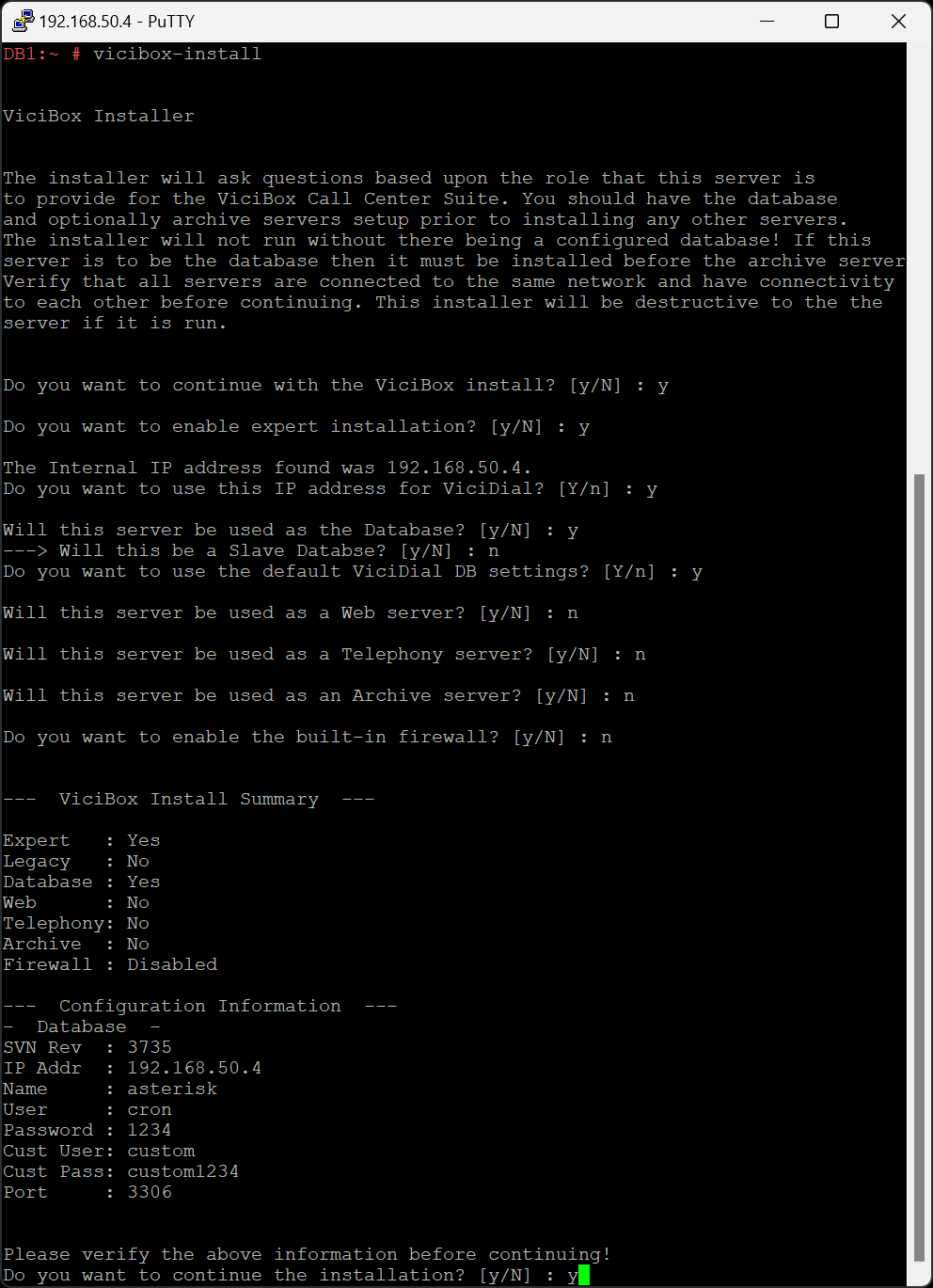
If not already, login as the
rootuser to get to the # command prompt.Type
vicibox-installand pressENTERto start the ViciBox installer.Type
Yand pressENTERat the ViciBox install prompt.Type
Yand pressENTERat the expert installation prompt.The installer will attempt to find a LAN IP address to use for the cluster. If the IP shown is correct type
Yand pressENTER. If not typeNand pressENTERand follow the prompts.Type
Yand pressENTERat the the Database prompt.Type
Nand pressENTERat the Slave Database prompt.Type
Yand pressENTERat the DB settings prompt. If you want to use different database settings typeNand pressENTERto follow those prompts.Type
Nand pressENTERat the Web server prompt.Type
Nand pressENTERat the Telephony server prompt.Type
Nand pressENTERat the Archive server prompt.Type
Nand pressENTERat the built-in firewall prompt.A summary will be listed of all selected options. Type in
Yand pressENTERto accept and install.Type
rebootand pressENTERto reboot and cleanly load vicidial.Login as the
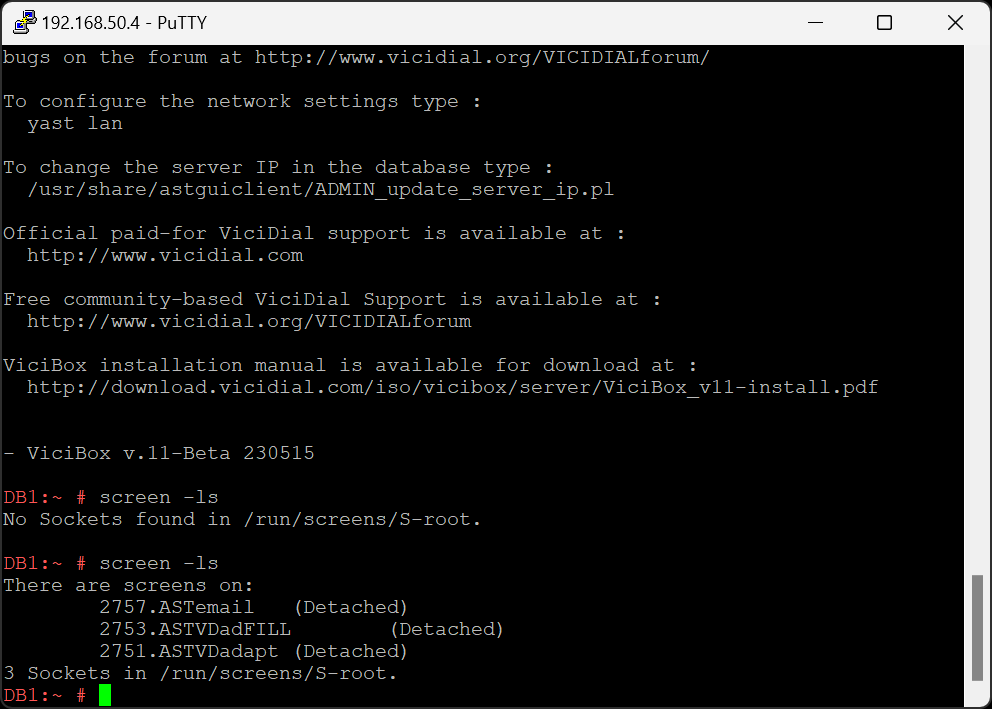
rootuser to get to the # command prompt.Type
screen -lsand pressENTERto show running screen sessions. There should be three listed like in the screenshotThis will create an entry under called DB1. Do not delete this entry as it’s needed for ViciDial to function properly.
Screenshots
- Install Database
- Verify screen sessions
Web
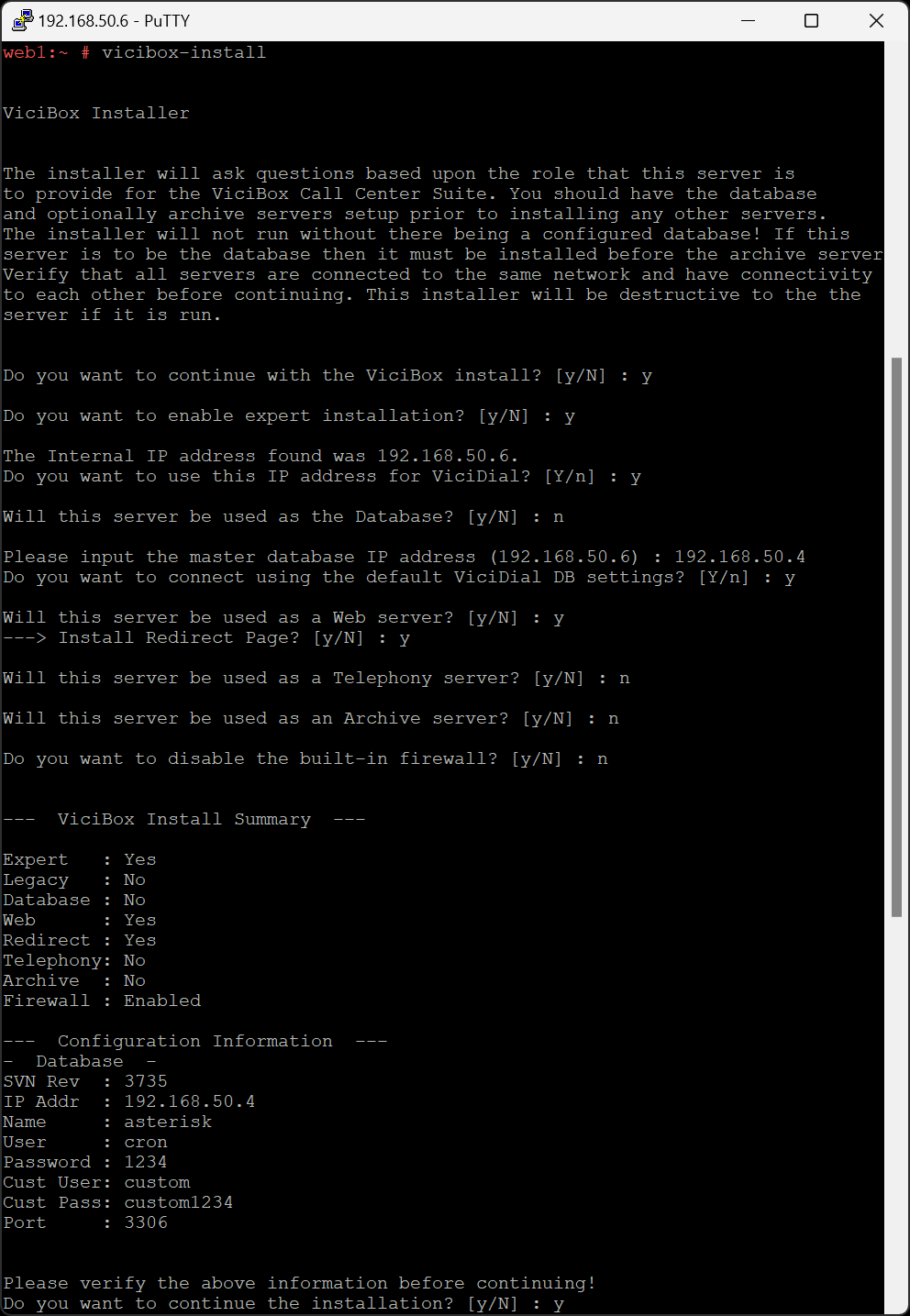
If not already, login as the
rootuser to get to the # command prompt.Type
vicibox-installand pressENTERto start the ViciBox installer.Type
Yand pressENTERat the ViciBox install prompt.Type
Yand pressENTERat the expert installation prompt.The installer will attempt to find a LAN IP address to use for the cluster. If the IP shown is correct type
Yand pressENTER. If not typeNand pressENTERand follow the prompts.Type
Nand pressENTERat the the Database prompt.Type in the Database IP address and press
ENTER, I.E.192.168.50.4. If the installer is unable to connect to the Database server it will error out. Correct any issues and run the installer again.Type
Yand pressENTERat the Web server prompt.Type
Yand pressENTERat the Redirect Page prompt.Type
Nand pressENTERat the Telephony server prompt.Type
Nand pressENTERat the Archive server prompt.Type
Nand pressENTERat the built-in firewall prompt.A summary will be listed of all selected options. Type in
Yand pressENTERto accept and install.Type
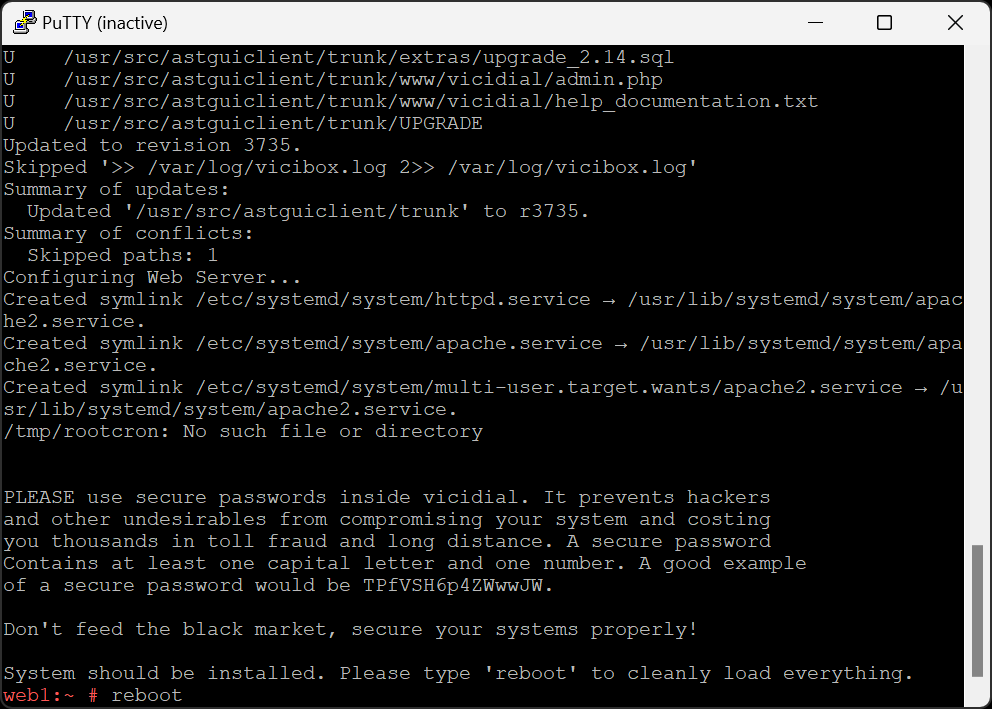
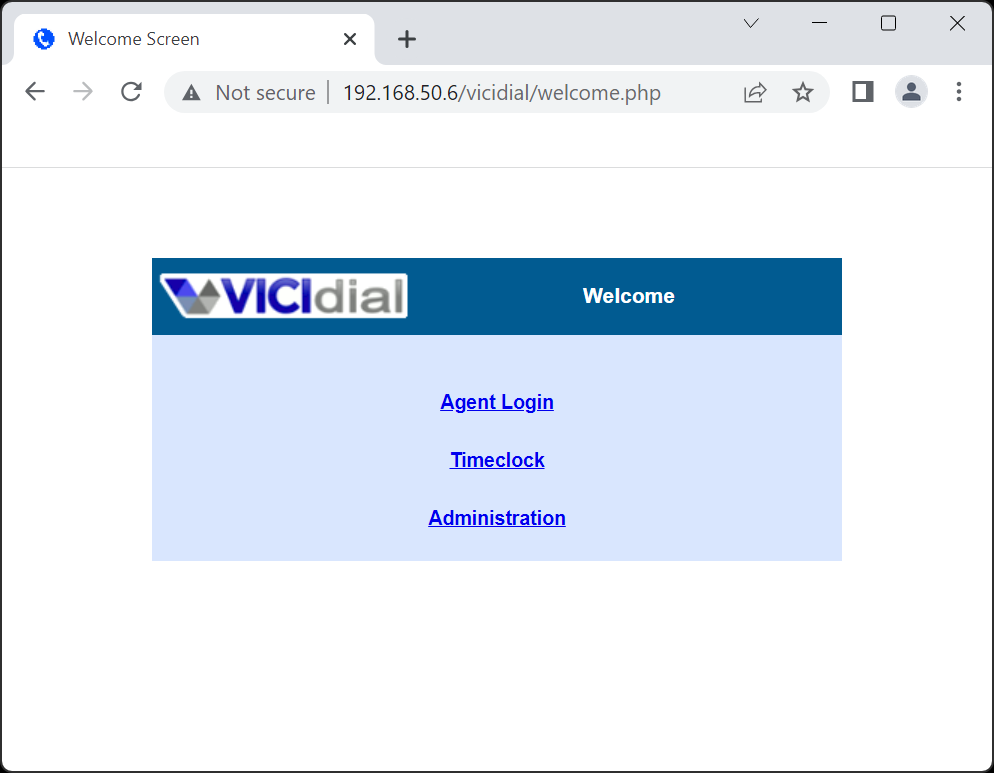
rebootand pressENTERto reboot and cleanly load vicidial.Once the server has rebooted, verify you can reach the web interface by going to the server’s IP address in a browser, I.E.
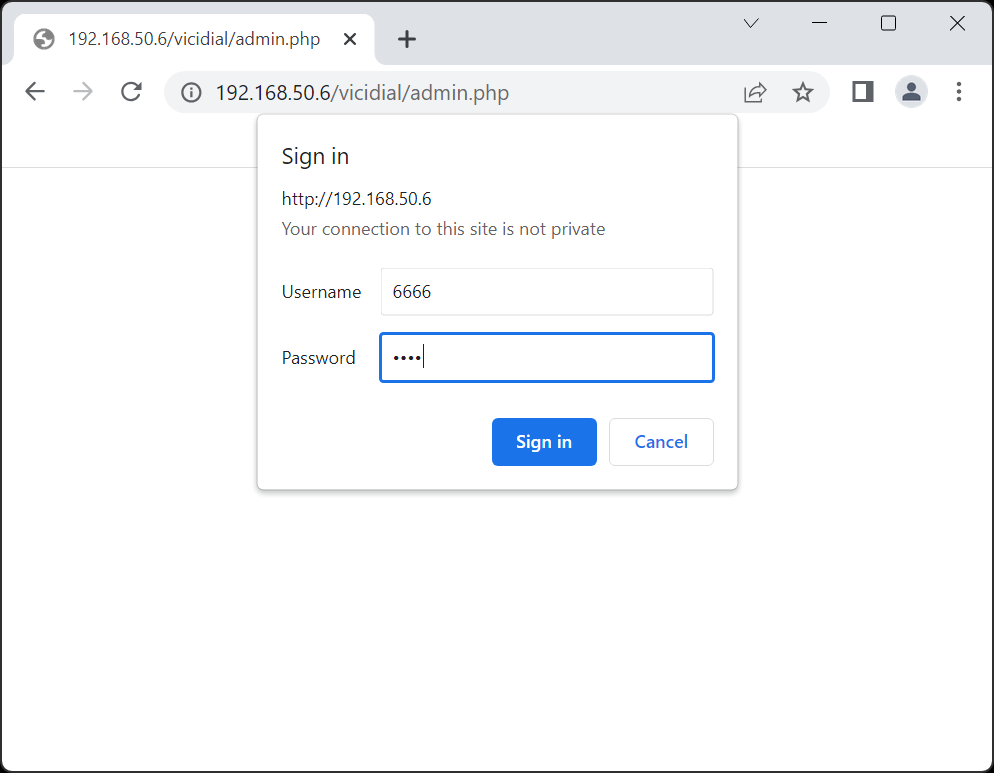
192.168.50.6, and pressENTERClick on Administration and login with Username
6666and Password1234to continue with the ViciDial Initial Setup.It is recommended to give the 6666 user all Admin permissions before continuing. If there are multiple web servers in the cluster these instructions can be repeated on any additional servers.
Screenshots
- Install Web
- Reboot
- Verify web interface
- Login with default user
- Continue to ViciDial Initial Setup

Telephony
If not already, login as the
rootuser to get to the # command prompt.Type
vicibox-installand pressENTERto start the ViciBox installer.Type
Yand pressENTERat the ViciBox install prompt.Type
Yand pressENTERat the expert installation prompt.The installer will attempt to find a LAN IP address to use for the cluster. If the IP shown is correct type
Yand pressENTER. If not typeNand pressENTERand follow the prompts.Type
Nand pressENTERat the the Database prompt.Type in the Database IP address and press
ENTER, I.E.192.168.50.4. If the installer is unable to connect to the Database server it will error out. Correct any issues and run the installer again.Type
Nand pressENTERat the Web server prompt.Type
Yand pressENTERat the Telephony server prompt.Do stuff here?
Type
Nand pressENTERat the Archive server prompt.Type
Nand pressENTERat the built-in firewall prompt.A summary will be listed of all selected options. Type in
Yand pressENTERto accept and install.Type
rebootand pressENTERto reboot and cleanly load ViciDial.Once the reboot is complete, log back in as root to get to the # command prompt.
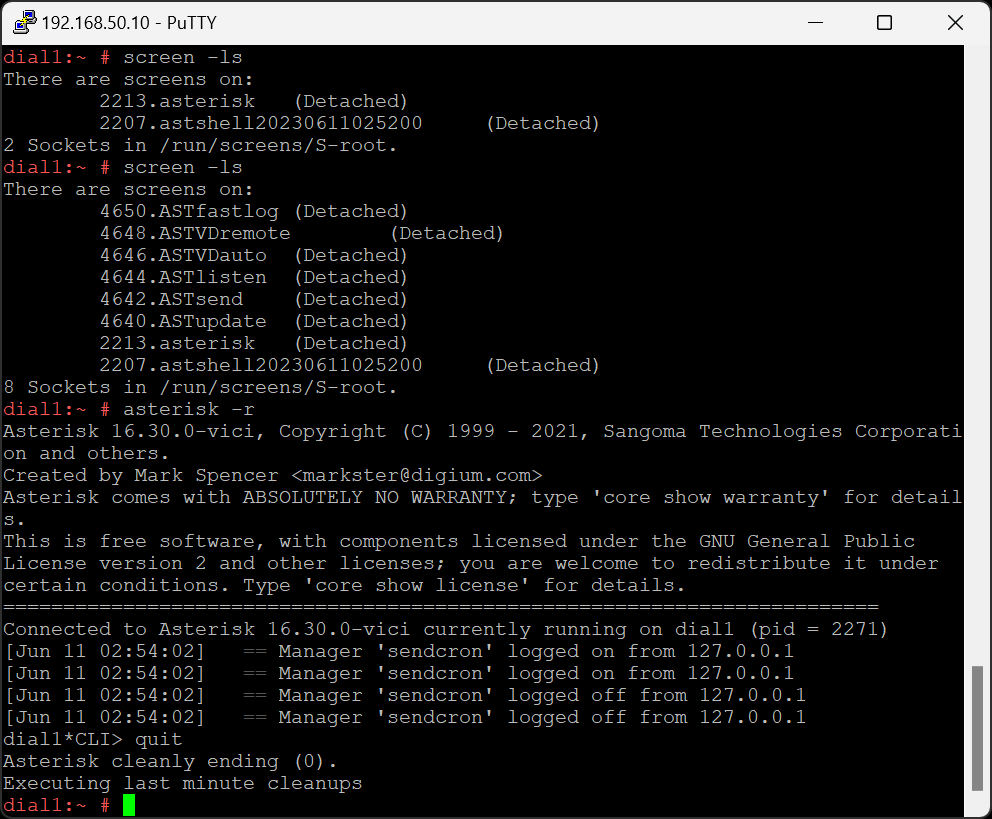
Type
screen -lsand pressENTER. While it might take upwards of 5 minutes, eventually there should be 8 Sockets in /run/screens/S-rootType
asterisk -rand pressENTERto connect to the Asterisk console. There should be different processes like sendcron logging on and off.Type
quitand pressENTERto exit back to the # command prompt.The Telephony server is now installed. If there are multiple telephony servers in the cluster these instructions can be repeated on any additional servers.
Screenshots
- Install Telephony server

- Reboot and verify Asterisk running